Test with TestFlight
This is where you rejoin the process if Eluvio handled the build for you. Whoever compiled it, you are the one submitting it and answering for it, so check it yourself on real hardware before it goes to App Review.
Do not submit an unverified build to App Review. A rejection costs days; a TestFlight round trip costs minutes.
Internal testers
Internal testers are members of your App Store Connect team. Up to 100 of them, no review required, available as soon as processing finishes.
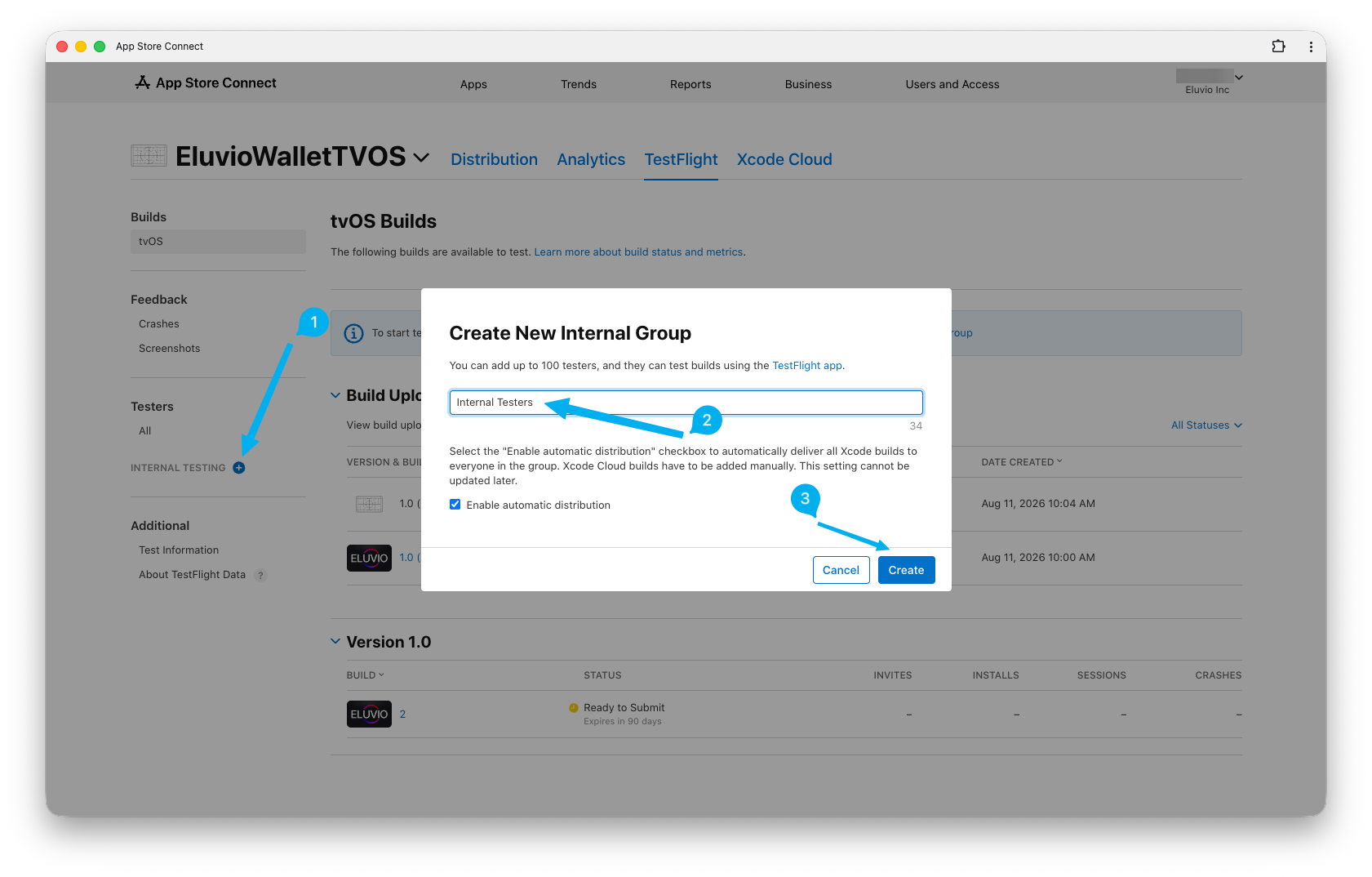
Testers belong to a group, so create one before you can add anybody.
-
On the TestFlight tab, click + beside INTERNAL TESTING in the sidebar (1).
-
Give the group a name (2). It is only a label for your own use — "Internal Testers", "QA", the name of a release, anything. Nothing downstream depends on it.
-
Leave Enable automatic distribution ticked so that every build you upload reaches the group without you doing anything further. This one cannot be changed once the group exists, so if you would rather release builds to testers deliberately, untick it now.
-
Click Create (3).
-
With the group created, add the team members you invited to it.
-
They receive an email; they install the TestFlight app on their Apple TV and accept.
External testers (optional)
For testers outside your team — up to 10,000 people. This requires Beta App Review, typically 1–2 days, and you must supply a description of what to test plus contact information.
What to actually test
At minimum, on real Apple TV hardware:
- App launches and shows your property's start screen with your logo and background
- Your custom app icon and top shelf image appear correctly on the home screen
- Sign-in works end to end
- DRM-protected video plays, seeks, and resumes
- Siri Remote navigation reaches everything — no focus traps, no unreachable buttons
- The app recovers from being backgrounded and relaunched
- Behavior is sane with no network connection
This is also the moment to capture your App Store screenshots, since you have a working build on real hardware.
Next
When the build looks right, prepare the store listing and submit.